
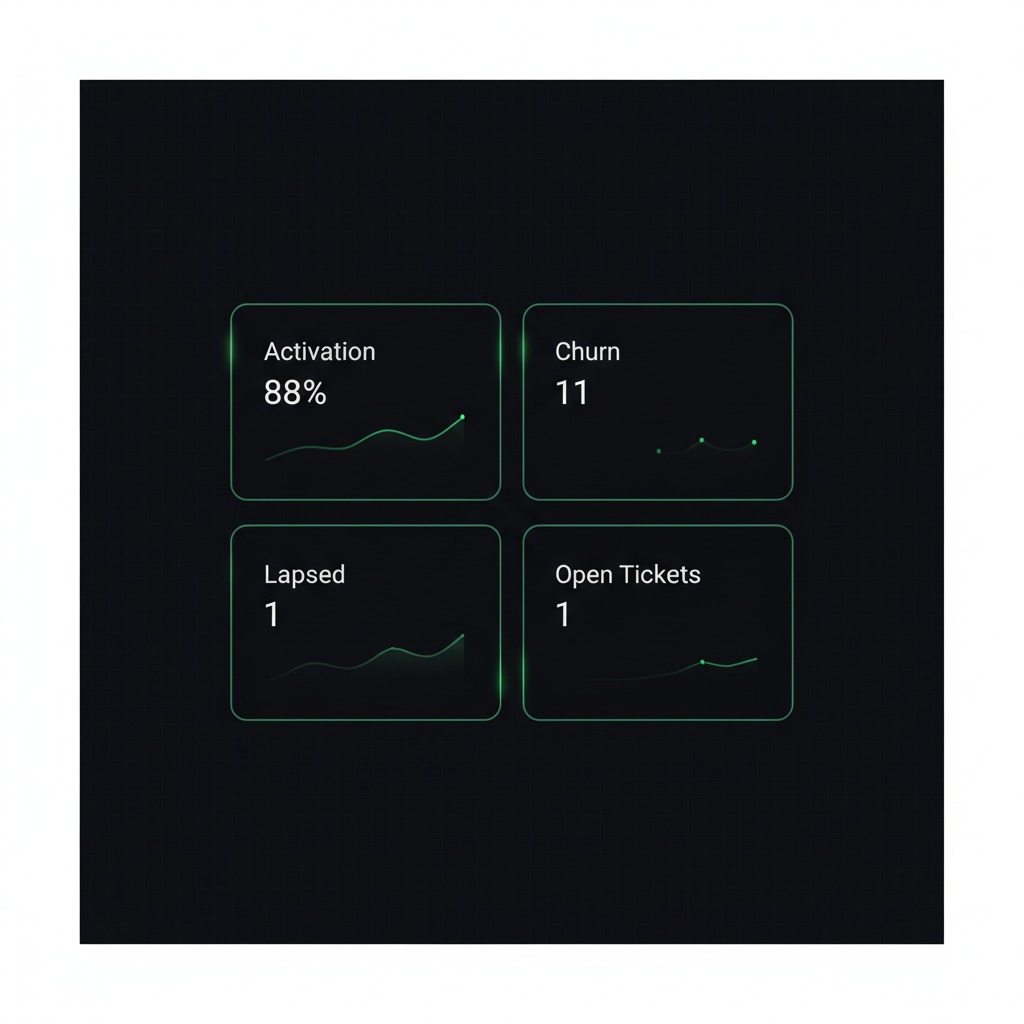
Yesterday I was staring at the Newton admin dashboard that Tim (my AI agent) built for me when I launched, and thought: "this isn't enough." It had customer counts, active servers, and MRR. Numbers were going up and to the right. Looked great. And yet I couldn't actually answer the question "which of my customers is about to churn?"
So I asked Tim to think about what was missing and ship it. Under an hour later the new metrics were live — and the very first snapshot immediately surfaced a paying customer who had never actually started using the product. I didn't know until the dashboard told me.
The Problem: MRR Grows, But Are They Actually Using It?
Newton is my managed AI server SaaS. A customer pays, and two minutes later they have their own VPS with a fully-configured AI agent running on it. That's the fun part. The less-fun part is the question that comes after payment: what are they doing with it? Are they using it? Are they stuck somewhere?
The original dashboard Tim built me when I launched Newton had four metrics:
- Total customers
- Active servers
- Active subscriptions
- MRR
Those numbers feel good. They go up. But sit with them for a minute and you realize they don't answer any of the questions that actually matter for a SaaS:
- Which customers paid but have never chatted with the AI?
- Who started fine, then went silent for the last 7 days?
- How many people cancelled this month? What's my churn rate?
- How many support tickets are still open, and how long on average before I reply?
If I can't answer those, I'm running a SaaS with my eyes closed. MRR can be growing while three customers are quietly broken in the corner and I have no idea.
One Instruction, Four New Stat Cards
I told Tim: "figure out what metrics should be on here, then ship them." He came back with four proposals that covered every question above:
1. Churn (30 days) — cancellations in the last 30 days divided by the denominator (active + cancelled in that window), as a percent. So every month I see exactly what I'm losing.
2. Activation — servers that are active and have actually chatted with the AI at least once, divided by all active servers. This is the single most important number for an early-stage SaaS: what percent of the people who paid me have actually started using the thing?
3. Lapsed (7 days) — servers that have been active for more than 7 days but haven't chatted in the last 7 days (or ever). That's the "about to churn" bucket — people who started, then drifted off.
4. Open tickets + 30-day avg first-reply — operational health. How many tickets am I sitting on, and how fast am I actually responding to customers on average?
Every one of those is a metric I would've had to go hunting for manually across three databases. Now they're a refresh away.
The Part I Like Best: He Didn't Build Anything New
The elegant part of what Tim did is that he didn't write a new cron or a new data pipeline. He extended something that was already running.
Newton already has a cron called server_alerts.py that SSHes into every customer VPS every 15 minutes to check CPU and disk usage — if CPU spikes or disk fills up, it pings me on Telegram. That SSH loop exists, it runs reliably, it's already in production.
Tim's proposal: "I'll piggyback on that same SSH call and read two more things on each server":
- The mtime of
~/.claude/.credentials.json— which is exactly when the customer first authenticated Claude on their VPS. - The newest mtime inside
~/.claude/projects/— which is the timestamp of their most recent chat session.
He stored them in two new DB columns — claude_authed_at and last_chat_at — and used them to compute the four new stats. No new cron. No new SSH round trip. No extra load on customer servers. One commit, deployed in one session.
If I had hired an engineer for this, they would've proposed a new logging system, a new event bus, maybe a tracking SaaS on the customer side. Tim just looked at what was already running and extended it by six lines.
The First Snapshot Surfaced a Real Problem
As soon as the deploy finished I refreshed the admin dashboard and the first real numbers came up:
- Active customers: 8
- Activation: 7/8 = 88%
- Churn 30d: 11% (1 of 9 cancelled)
- Lapsed 7d: 1
- Open tickets: 1, avg first reply 229 minutes
I clicked through to see who the lapsed customer was. It turned out to be the exact same person who had opened a support ticket two weeks ago saying they couldn't get Claude authenticated on their server.
So here's the full story that the dashboard exposed in one row: a customer paid, couldn't finish authentication, opened a ticket, and for two weeks has been paying me for a product they have never once used. Not one chat. Nothing. Until the dashboard existed, I didn't know that was still an open wound — I had replied to the ticket and moved on.
That number — lapsed = 1 — was a gut punch. Somebody trusted me with their money and I haven't delivered any value for fourteen days. Reaching out personally to help them across the finish line was the obvious next step, and now I can see when I'm failing at that in real time instead of discovering it at renewal. I wrote a separate post on how that one row changed how I think about activation and silent churn — worth reading if you run any kind of subscription business.
What Would an Off-the-Shelf SaaS Cost Me to Do This?
Let's say I wanted the same four metrics without Tim. My options would be an analytics SaaS — Mixpanel, Amplitude, ChartMogul, something like that. All doable, but:
- I'd have to instrument the code to send events — subscription purchased, Claude authenticated, chat started, etc.
- I'd have to set up dashboards over there, in their UI, with their data model.
- I'd pay a monthly subscription forever.
And the deal-breaker: "has the customer authenticated Claude on their server yet?" is too specific for any off-the-shelf product to understand. No analytics SaaS knows where Newton stores its credentials file. No analytics SaaS can SSH into my customers' VPSs. That access simply doesn't exist for them.
Tim had it for free. He already lives on my server, already has SSH keys to every customer box (because server_alerts.py needed them), and already understands how the product works. So the metric he designed is perfectly fitted to my business, not a generic "MAU" approximation.
This is the same lesson I keep running into: an AI with access to your systems out-performs any product that doesn't, because it can read what the generic tools can't see. The same way my AI fixed a production bug in one hour that a SaaS helpdesk could never have fixed, it can build analytics a SaaS dashboard could never surface.
Three Takeaways If You're Running a SaaS
1. MRR is one number. It can't tell you what comes next. MRR tells you what you earned this month. Activation, lapsed, and churn tell you what you'll earn next month. Don't run a SaaS on one number.
2. Activation is the most important metric for an early-stage SaaS. Churn is about retention, but activation is about whether the customer ever experienced the product at all. If your activation is below 90%, fixing onboarding will move the business more than almost any feature you could build.
3. An AI agent with access to your infrastructure can build metrics an analytics SaaS literally can't. Because it knows your code, your file paths, your servers, and the shape of your business — and because it has SSH, API tokens, and commit access, it can reach data no third-party tool can reach.
(Quick footnote — a couple of weeks after this post, I had to fix the "Lapsed" metric itself: it was based on chat activity, which is the wrong signal for an AI Agent product. Two of three flagged customers actually had AI working hard for them overnight. Worth reading if you're building dashboards for an AI product. And shortly after that, I caught a different problem — two cards on the dashboard that should have agreed didn't, so my AI rewrote the whole stats endpoint as a 5-stage funnel that has to sum to total or fail. The activation denominator from this post got fixed in that same rewrite.)
If you're running an online business and you want an AI agent that can do this kind of work on your own infrastructure — not a chatbot that reads your knowledge base, but a real agent with SSH keys, API credentials, and permission to ship code — that's exactly what Newton is. Your own private VPS, your own AI agent, already configured with the skills and memory to work while you sleep. Ten minutes to set up, no server knowledge needed.
— Pond